India Passport (applying abroad) Photo — at home in 60 seconds
Indian Passport / renewal applied abroad (Global Passport Seva 2.0 via Indian missions, VFS Global, BLS)
Take it with your phone against a plain, light wall. We crop it to the exact size and check the head size, position and background against the published rules.
Free to try. From $3.99, paid once, only if you like your photo.
Limited time offer then $6.99 from Jan 1, 2027
Your exact local price is shown before you take your photo. Processed on your device. Never uploaded to our servers.
Quick answer
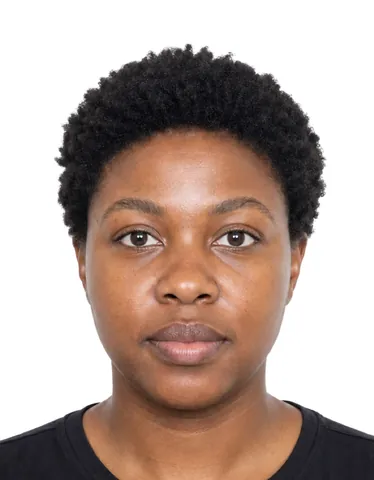
An India Passport (applying abroad) Photo must be a digital file of 630 × 810 px (up to 250 KB, JPEG), on a white background. A photo you take yourself is accepted when it meets these rules.
- Digital file
- 630 × 810 px · up to 250 KB · JPEG
Verified October 3, 2026 from Ministry of External Affairs, Passport Seva.
Photo requirements
Summarised from the official sources below.
- Digital file
- 630 × 810 px · up to 250 KB · JPEG
- Background
- White. Background of the photograph should be white; dark-coloured clothing recommended by mission guidance.
- Expression
- Natural expression, mouth not open, eyes open and clearly visible, looking directly at camera, head not tilted.
- Glasses
- Glasses to be taken off to avoid reflections.
- Head covering
- Not permitted except for religious reasons; facial features from bottom of chin to top of forehead and both edges of face must be clearly shown.
- Online application
- Applicant uploads the photo on the Global Passport Seva 2.0 portal (mportal.passportindia.gov.in/gpsp) before mailing/submitting to VFS/BLS/mission.
More rules (7)
- Close-up of the head and top of the shoulders such that the face takes up 80-85% of the photograph.
- Colour photo, exactly 630 x 810 pixels (one mission copy says 'minimum 630*810').
- Photos must be unaltered by computer software (no retouching/beauty filters).
- Uniform lighting, no shadows, no flash reflections, no red-eye, not blurred; no hair across the eyes.
- Taken from about 1.5 m from the camera (not too close).
- Final JPG must be below 250 KB (mission 'Assistance in Photograph upload' guide).
- Maximum 12 upload attempts (photo + signature + documents) per application form; a scanned signature must also be uploaded.
Digital upload only
This document uses a digital photo, so there is nothing to print.
How to take it at home
- Stand about half a metre in front of a plain, light wall, facing a window.
- Hold the phone at arm’s length or ask someone to help. The live guide checks distance, light and head position.
- Get your digital file and print sheet. Print at 100% or upload the file.
Price
Free to try. From $3.99, paid once, only if you like your photo.
Limited time offer then $6.99 from Jan 1, 2027
Your exact local price is shown before you take your photo.
Photo Acceptance Guarantee — rejected for a technical reason we check? We refund you.
Why people choose Ovalight
Made for the moment you need a photo that just works.
- Money back if it’s rejected Rejected for a technical reason we check? We refund you.
- Free to try Take and check your photo for free. You pay once, only when you like the result.
- Your photo stays on your phone Processed on your device. Never uploaded to our servers.
- Checked against the official rules Every rule comes from the issuing authority’s own website, last verified on October 3, 2026.
- Free retakes for 24 hours Not happy with it? Retake the same document up to 3 times within 24 hours.
- Secure payment, no subscription Pay once through Stripe. We never see your card details.
Official sources
Verified on October 3, 2026
- Guidelines for ICAO Compliant Photographs for Passport Applications — Ministry of External Affairs, Passport Seva
- Process for Photo editing as per ICAO Guidelines (crop/resize 630x810, <250 KB) — High Commission of India, Kampala
- Uploading Photograph/Signature/Documents made mandatory w.e.f. 1 Dec 2025 — High Commission of India, Kampala
- Important Notice: Migration to GPSP 2.0 — Consulate General of India, Seattle
- Migration to a New Version of Passport Seva Portal (GPSP 2.0) — Embassy of India, Washington DC
Questions
What size is a India Passport (applying abroad) Photo?
Digital: 630 × 810 px · up to 250 KB · JPEG.
Can I take my India Passport (applying abroad) Photo at home?
Yes. The photo is not taken at the office and no registered photographer is required, so a photo you take yourself is accepted when it meets the rules on this page.
What background is required?
White. Background of the photograph should be white; dark-coloured clothing recommended by mission guidance.
Can I smile?
Natural expression, mouth not open, eyes open and clearly visible, looking directly at camera, head not tilted.
Can I wear glasses?
Glasses to be taken off to avoid reflections.
Can I wear a head covering?
Not permitted except for religious reasons; facial features from bottom of chin to top of forehead and both edges of face must be clearly shown.
More India documents
Ovalight is an independent service. Only the authority that issues your document decides whether to accept a photo.