Job & CV photos
Your CV photo and LinkedIn headshot, made at home
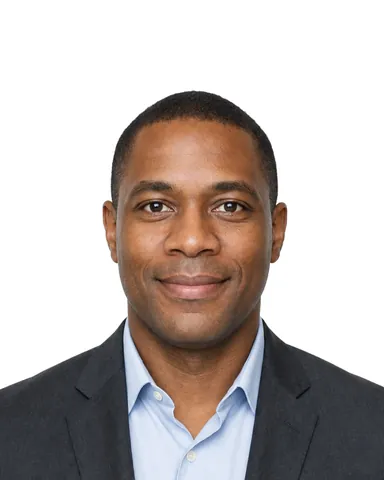
Take a head-and-shoulders photo with your phone. We frame it, even out the plain wall behind you to white, light grey or light blue, and give you the right size for your CV, job applications and LinkedIn.
- A natural smile is welcome
- White, light grey or light blue background
- Your real face: nothing is retouched or generated
Free to try. From $3.99, paid once, only if you like your photo.
Processed on your device. Never uploaded to our servers.
Why your CV photo matters
Your photo is often the first thing a recruiter sees. It will not get you the job on its own, but a clear, friendly photo helps your application start with a calm, professional impression.
-
First impressions are quick
People read a face very fast. In a well-known study, judgements of traits such as trustworthiness and competence made after seeing a face for a tenth of a second closely matched judgements made with no time limit. A clear, well-lit photo makes sure that first look is about you, not about a dark room or a cropped holiday snap.
Study: J. Willis, A. Todorov (2006), First impressions: making up your mind after a 100-ms exposure to a face , Psychological Science 17(7).
-
One photo everywhere
Use the same photo on your CV, LinkedIn and job portals. A recruiter who looks you up recognises you at once, and your applications look consistent.
-
It shows you as you are
A recent photo without filters or beauty retouching means the person at the interview matches the photo. We only crop it and even out the wall; your face is never changed or generated.
-
Some countries expect it
In Germany, Austria and Switzerland a photo is still common on a CV, and Japanese resume forms have a box for one. In other places it is optional or unusual: see the overview below.
White, light grey or light blue background
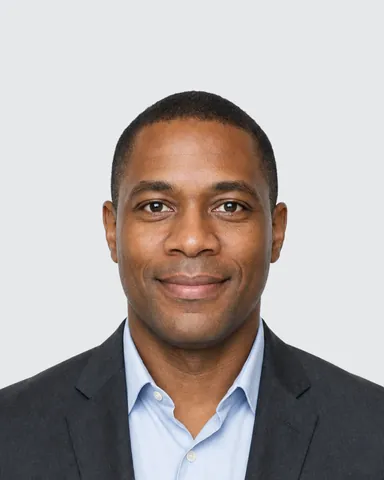
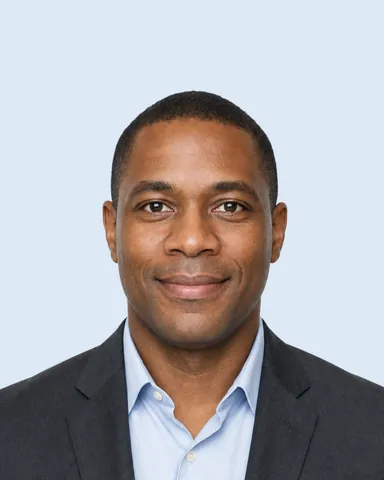
Stand in front of any plain wall. In the Studio you choose the colour after the photo, and we even out the wall to it. All three look calm and professional; pick the one that stands out best from your clothes.
-
White -
Light grey -
Light blue
Shelves, pictures or patterned wallpaper behind you cannot be cleaned away, so find a bare spot of wall. Example (AI-generated model)
How your photo looks in a CV
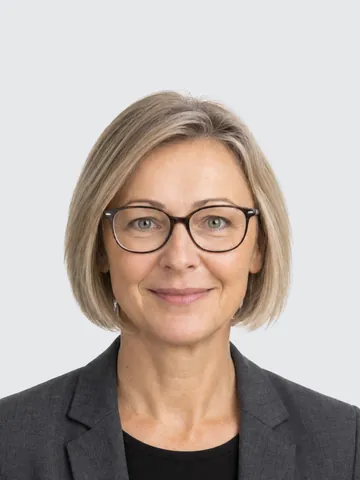
Three common CV layouts and a profile card, each with a photo size the Studio makes. The people are fictional, AI-generated models; on your CV it will be your own photo.
- Curriculum vitae Katrin Weber Project Manager
 Personal detailsHamburgExperience2019 – today2014 – 2019Education2008 – 2014Skills ScrumSAPExcelLanguages German · English · French
Classic CV with the photo at the top right (45×60 mm): the usual layout in Germany, Austria and Switzerland. -
 Contact Osaka Skills TypeScriptPythonAWS Languages Japanese · English Kenji Sato Software Engineer Profile Experience 2021 – today 2018 – 2021 Education 2014 – 2018
Modern two-column CV with the photo at the top of the sidebar. -
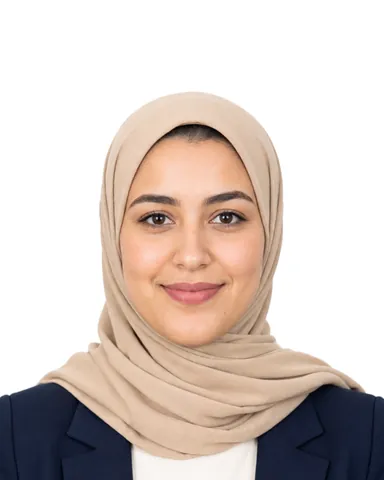 Layla Haddad Financial Analyst DubaiExperience 2020 – today 2016 – 2020 2013 – 2016 Education 2009 – 2013Skills ExcelIFRSPower BI Languages Arabic English French Contact
Compact one-page CV with a small photo next to the name (40×50 mm), common in the Gulf states. -
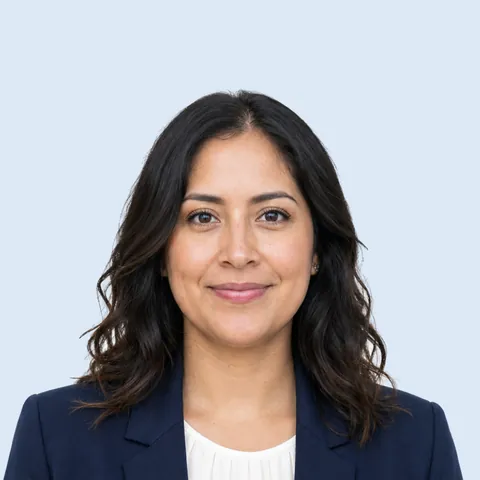 Sofía Ortega Marketing Manager Madrid ConnectMessageProfileExperienceEducation
Profile card in the style of LinkedIn: the square photo is shown as a circle, so keep your head in the middle.
Do you need a photo on your CV?
It depends on where you apply. This is what is usual; if the job ad says otherwise, follow the ad.
- Germany, Austria, Switzerland
- A photo is still common and many employers expect one, although it is not required. It usually sits at the top of the CV: a 45×60 mm or 40×50 mm print, or a digital file for online applications.
- United States, Canada
- Usually no photo. Many employers prefer CVs without photos to avoid any bias in hiring, so leave it off unless the employer asks. Put your photo on LinkedIn instead.
- United Kingdom, Ireland
- Usually no photo, for the same reason. Exceptions are jobs where appearance is part of the role, such as acting or modelling.
- France, Belgium, Spain, Latin America
- A photo is optional. It is still fairly common, but more and more applicants leave it off.
- Turkey
- A photo is common on CVs, usually a recent head-and-shoulders photo on a plain background.
- Russia and other CIS countries
- A photo is common, especially on job-site profiles, but it is not required.
- Gulf states
- A photo is common on CVs, usually a professional head-and-shoulders photo on a plain background.
- Japan, South Korea
- Japanese resume forms (履歴書) have a box for a 30×40 mm photo, and it is expected. In South Korea a 30×40 mm photo was standard, but many employers now hire without one.
Applying where photos are unusual? Leave it off the CV and use the same photo for LinkedIn and your job-portal profiles.
CV photo do's and don'ts
Do
- Face a window in daylight, so the light on your face is soft and even.
- Stand in front of a plain wall: we even it out to white, light grey or light blue.
- Frame your head and shoulders, with your head filling about half of the photo height.
- Wear what you would wear to the interview, in plain colours that stand out from the background.
- Smile naturally: a relaxed, friendly face is welcome on a CV photo.
- Keep your glasses on if you wear them every day; just avoid glare.
Don't
- Crop yourself out of a holiday or group photo.
- Hold the phone at arm's length: that close, the camera distorts your face. Prop it up and step back, or ask someone to help.
- Stand in front of shelves, posters or a patterned wall: a busy background cannot be cleaned away.
- Use filters or beauty retouching. The person at the interview should match the photo.
- Wear sunglasses or a cap. Religious head coverings are fine.
- Stand under a ceiling lamp or with a bright window behind you.
Formats and sizes
Every format comes as a digital JPEG. The printed formats also come as a print sheet with cut lines, and their digital file opens at the printed size in a word processor.
-
CV & LinkedIn photo
For your CV file, job portals and LinkedIn.
Digital 800×1000 px
-
Square profile photo
For LinkedIn and other profile pictures.
Digital 800×800 px
-
Job application photo 45×60 mm
The usual job application photo (Bewerbungsfoto) in Germany, Austria and Switzerland.
Digital 900×1200 px · Print 45×60 mm
-
Job application photo 40×50 mm
A slightly smaller Bewerbungsfoto for a compact CV layout.
Digital 800×1000 px · Print 40×50 mm
-
Resume photo 30×40 mm
For the Japanese resume form (履歴書) and Korean resumes.
Digital 600×800 px · Print 30×40 mm
How it works
-
Choose your format
CV and LinkedIn (4:5), square profile photo, 45×60 mm or 40×50 mm Bewerbungsfoto, or 30×40 mm resume photo.
-
Take the photo
Stand in front of a plain wall, facing a window. The live guide helps with distance, light and head position.
-
Pick the colour and download
Choose white, light grey or light blue for the background, then download your digital file and, for printed formats, a print sheet.
One price, paid once
Free to try. From $3.99, paid once, only if you like your photo.
Limited time offer then $6.99 from Jan 1, 2027
Your exact local price is shown before you take your photo. One-time payment · No subscription
Job and CV photos have no official rules to check against, so the refund guarantee does not cover them. You see the finished photo before you pay.
CV photo questions
Should I put a photo on my CV?
It depends on the country. In Germany, Austria and Switzerland a photo is common and often expected; in the United States, Canada, the United Kingdom and Ireland CVs usually have no photo. When the job ad asks for one, add it.
What size is a CV photo?
For printed CVs in German-speaking countries, 45×60 mm or 40×50 mm. For digital CVs and job portals, a 4:5 photo such as 800×1000 px works well. Japanese resume forms use 30×40 mm.
What size should a LinkedIn profile picture be?
Use a square photo. Profile sites such as LinkedIn show it as a circle, so keep your head in the middle. Our square file is 800×800 px, large enough to stay sharp.
Can I take a professional CV photo at home with my phone?
Yes. Face a window in daylight, stand in front of a plain wall and prop your phone at eye level, or ask someone to take it. The Studio's live guide helps with distance, light and head position, then frames the photo and evens out the wall.
Can I smile on a CV photo?
Yes. A relaxed, natural smile is welcome, and the Studio does not ask for a neutral face. It only points out a wide-open mouth.
Which background colour is best for a CV photo?
White, light grey and light blue all look calm and professional. Choose the one that stands out from your clothes; you pick it after taking the photo.
What should I wear for a CV photo?
What you would wear to the interview. Plain, solid colours look best; avoid busy patterns and clothes in the same colour as the background.
Is this an AI headshot?
No. Ovalight does not generate or change your face. It crops your real photo to the format and evens out the plain wall behind you, so the photo looks like you at the interview.
Is my photo uploaded?
No. Processed on your device. Never uploaded to our servers. You can check it with airplane mode.
How much does it cost?
The same one-time price as our document photos, from $3.99. There is no subscription, and you see your photo before you pay.