Israel B2 Tourist e-Visa Photo — at home in 60 seconds
Israel eVisa-B2 tourist visa (online, for visa-required nationals)
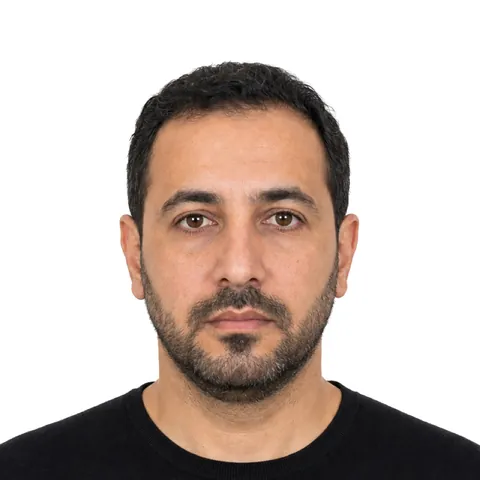
Take it with your phone against a plain, light wall. We crop it to the exact size (50×50 mm) and check the head size, position and background against the published rules.
Free to try. From $3.99, paid once, only if you like your photo.
Limited time offer then $6.99 from Jan 1, 2027
Your exact local price is shown before you take your photo. Processed on your device. Never uploaded to our servers.
Quick answer
An Israel B2 Tourist e-Visa Photo must be 50 × 50 mm (1.97 × 1.97 in) when printed, or a digital file of aspect 1:1 (150 KB – 2 MB, JPEG/PNG), on a white background. A photo you take yourself is accepted when it meets these rules.
- Printed photo
- 50 × 50 mm (1.97 × 1.97 in)
- Digital file
- aspect 1:1 · 150 KB – 2 MB · JPEG, PNG
Verified October 3, 2026 from Population and Immigration Authority (PIBA).
Photo requirements
Summarised from the official sources below.
- Printed photo
- 50 × 50 mm (1.97 × 1.97 in)
- Digital file
- aspect 1:1 · 150 KB – 2 MB · JPEG, PNG
- Background
- White. 'Plain white background' in the document description; portrait guidance also allows 'plain light colored or white'. Use white.
- Expression
- Full face, front view, eyes open, neutral expression, no smile.
- Glasses
- No glasses (portrait guidance: 'No glasses, hats, or masks').
- Head covering
- No hats or masks (no religious exception stated on the portal).
- Online application
- israel-entry.piba.gov.il eVisa-B2 form → 'Upload documents' step (document type 'Passport Photo')
More rules (6)
- Clear, current passport-style colour photograph showing the entire face including hair and chin.
- Required dimensions: 5 cm (approx. 2 in) x 5 cm (approx. 2 in).
- Eyes open; no shadows on the face or background.
- Entire face visible from top of the head to the shoulders.
- No filters or major editing.
- Upload: JPG, JPEG or PNG only (no PDF, no animated PNG); facial image must be larger than 150 KB; max ~2 MB (larger files are auto-compressed by the page).
Print at home or at a kiosk
Print the sheet at 100% (Actual size), never “Fit to page”, on photo paper. Each sheet has a 50 mm ruler so you can check the size.
How to take it at home
- Stand about half a metre in front of a plain, light wall, facing a window.
- Hold the phone at arm’s length or ask someone to help. The live guide checks distance, light and head position.
- Get your digital file and print sheet. Print at 100% or upload the file.
Price
Free to try. From $3.99, paid once, only if you like your photo.
Limited time offer then $6.99 from Jan 1, 2027
Your exact local price is shown before you take your photo.
Photo Acceptance Guarantee — rejected for a technical reason we check? We refund you.
Why people choose Ovalight
Made for the moment you need a photo that just works.
- Money back if it’s rejected Rejected for a technical reason we check? We refund you.
- Free to try Take and check your photo for free. You pay once, only when you like the result.
- Your photo stays on your phone Processed on your device. Never uploaded to our servers.
- Checked against the official rules Every rule comes from the issuing authority’s own website, last verified on October 3, 2026.
- Free retakes for 24 hours Not happy with it? Retake the same document up to 3 times within 24 hours.
- Secure payment, no subscription Pay once through Stripe. We never see your card details.
Official sources
Verified on October 3, 2026
- Israel Entry – eVisa-B2 required documents (official portal) — Population and Immigration Authority (PIBA)
- eVisa-B2 application form – document descriptions and upload rules (official portal code) — Population and Immigration Authority (PIBA)
Questions
What size is a Israel B2 Tourist e-Visa Photo?
Printed: 50 × 50 mm (1.97 × 1.97 in). Digital: aspect 1:1 · 150 KB – 2 MB · JPEG, PNG.
Can I take my Israel B2 Tourist e-Visa Photo at home?
Yes. The photo is not taken at the office and no registered photographer is required, so a photo you take yourself is accepted when it meets the rules on this page.
What background is required?
White. 'Plain white background' in the document description; portrait guidance also allows 'plain light colored or white'. Use white.
Can I smile?
Full face, front view, eyes open, neutral expression, no smile.
Can I wear glasses?
No glasses (portrait guidance: 'No glasses, hats, or masks').
Can I wear a head covering?
No hats or masks (no religious exception stated on the portal).
Can I print the photo at home?
Yes. Print the sheet at 100% (Actual size) on photo paper, at home or at a pharmacy or kiosk, and check the size with the 50 mm ruler.
More Israel documents
Ovalight is an independent service. Only the authority that issues your document decides whether to accept a photo.