Japan My Number Card Photo — at home in 60 seconds
My Number Card (マイナンバーカード / Individual Number Card)
Take it with your phone against a plain, light wall. We crop it to the exact size (35×45 mm) and check the head size, position and background against the published rules.
Free to try. From $3.99, paid once, only if you like your photo.
Limited time offer then $6.99 from Jan 1, 2027
Your exact local price is shown before you take your photo. Processed on your device. Never uploaded to our servers.
Quick answer
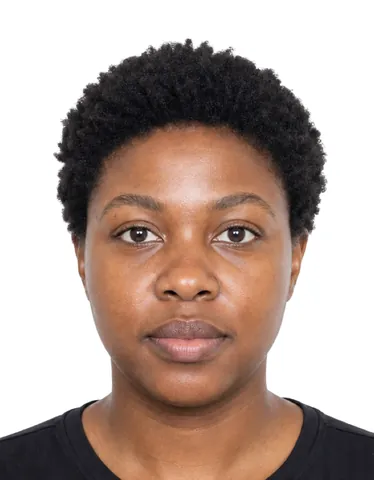
A Japan My Number Card Photo must be 35 × 45 mm (1.38 × 1.77 in) when printed, or a digital file of 480–6000 px (20 KB – 7 MB, JPEG), with the head 32–36 mm from chin to top of head, on a plain background, taken within the last 6 months. A photo you take yourself is accepted when it meets these rules.
- Printed photo
- 35 × 45 mm (1.38 × 1.77 in)
- Digital file
- 480–6000 px · 20 KB – 7 MB · JPEG
Verified October 3, 2026 from J-LIS (Japan Agency for Local Authority Information Systems), マイナンバーカード総合サイト.
Photo requirements
Summarised from the official sources below.
- Printed photo
- 35 × 45 mm (1.38 × 1.77 in)
- Digital file
- 480–6000 px · 20 KB – 7 MB · JPEG
- Head size (chin to top of head)
- 32–36 mm
- Space above the head
- 2–6 mm
- Background
- Plain. 無背景 (no background): no chair or objects, no shadow, no pattern. Colour not specified. Black-and-white photos are also accepted.
- Expression
- Front-facing, not tilted; expression must not differ markedly from normal appearance.
- Glasses
- Frames must not cover the eyes; no very thick frames covering much of the eyes/face; no lighting reflection on glasses; no sunglasses that prevent identification (unless worn daily for medical reasons).
- Head covering
- No hat. Head coverings (turban, hijab etc.) allowed for religious or medical reasons if the face outline is visible; medical wigs/hats/eye patches/sunglasses allowed if worn daily.
- Babies and children
- Infants or people who cannot stand/sit may be photographed lying face-up on a plain light-coloured sheet, from the front; a helper holding the child must not appear in the photo.
- Photo age
- Taken within the last 6 months
- Online application
- Online application (smartphone/PC) via J-LIS (kojinbango-card.go.jp); also at street ID-photo booths (まちなかの証明写真機) and by mail.
More rules (7)
- Taken within the last 6 months; front-facing, no hat, no background
- Black-and-white photos accepted
- Photos processed in a way that hinders face-to-face identity verification are not accepted; images edited with image-editing software may be refused
- No deformation or masking (縁取り) processing; no noise, dots, ink bleed or jaggies
- No hairband/hair covering the eyes or face outline; no red-eye; no blur; no shadows on face
- Mail application: write name and date of birth on the back
- Photo is reduced to 2.75 x 2.20 cm on the card
Print at home or at a kiosk
Print the sheet at 100% (Actual size), never “Fit to page”, on photo paper. Each sheet has a 50 mm ruler so you can check the size.
How to take it at home
- Stand about half a metre in front of a plain, light wall, facing a window.
- Hold the phone at arm’s length or ask someone to help. The live guide checks distance, light and head position.
- Get your digital file and print sheet. Print at 100% or upload the file.
Price
Free to try. From $3.99, paid once, only if you like your photo.
Limited time offer then $6.99 from Jan 1, 2027
Your exact local price is shown before you take your photo.
Photo Acceptance Guarantee — rejected for a technical reason we check? We refund you.
Why people choose Ovalight
Made for the moment you need a photo that just works.
- Money back if it’s rejected Rejected for a technical reason we check? We refund you.
- Free to try Take and check your photo for free. You pay once, only when you like the result.
- Your photo stays on your phone Processed on your device. Never uploaded to our servers.
- Checked against the official rules Every rule comes from the issuing authority’s own website, last verified on October 3, 2026.
- Free retakes for 24 hours Not happy with it? Retake the same document up to 3 times within 24 hours.
- Secure payment, no subscription Pay once through Stripe. We never see your card details.
Official sources
Verified on October 3, 2026
- 顔写真のチェックポイント — J-LIS (Japan Agency for Local Authority Information Systems), マイナンバーカード総合サイト
Questions
What size is a Japan My Number Card Photo?
Printed: 35 × 45 mm (1.38 × 1.77 in). Digital: 480–6000 px · 20 KB – 7 MB · JPEG.
Can I take my Japan My Number Card Photo at home?
Yes. The photo is not taken at the office and no registered photographer is required, so a photo you take yourself is accepted when it meets the rules on this page.
What background is required?
Plain. 無背景 (no background): no chair or objects, no shadow, no pattern. Colour not specified. Black-and-white photos are also accepted.
Can I smile?
Front-facing, not tilted; expression must not differ markedly from normal appearance.
Can I wear glasses?
Frames must not cover the eyes; no very thick frames covering much of the eyes/face; no lighting reflection on glasses; no sunglasses that prevent identification (unless worn daily for medical reasons).
Can I wear a head covering?
No hat. Head coverings (turban, hijab etc.) allowed for religious or medical reasons if the face outline is visible; medical wigs/hats/eye patches/sunglasses allowed if worn daily.
How recent must the photo be?
Taken within the last 6 months.
What about babies and children?
Infants or people who cannot stand/sit may be photographed lying face-up on a plain light-coloured sheet, from the front; a helper holding the child must not appear in the photo.
Can I print the photo at home?
Yes. Print the sheet at 100% (Actual size) on photo paper, at home or at a pharmacy or kiosk, and check the size with the 50 mm ruler.
More Japan documents
Other documents that use 35×45 mm
Ovalight is an independent service. Only the authority that issues your document decides whether to accept a photo.